Through Routers, Ethernet cables and Network
adapters
After you had successfully connected the PCs in yur house together
through router and wireless network adapters, you might want to
share resources and play LAN games.
All you have to do is to go through the Windows XP Network Setup.
Go to Start, Programs, Accessories, Communications, Network Setup
Wizard. Follow the instructions provided and complete the setup.
Note: Do the setup first on the computer which you intend to make
it a host. After which, do the same procedure for the rest of the
computers in yur network. After which, all yur computers in yur
network is able to "see" each other in Local Area Network. All yur
computers can now share resources and play LAN games.
Through Crossover cable and Network cards
With Ethernet technology, a two-computer network is the simplest of
all to install. Each computer needs an Ethernet network card
inside, and then you can run a crossover cable between them. That's
it! It's not much different than plugging an appliance into the
wall. Note that an Ethernet crossover cable is not the same thing
as an normal Ethernet cable. For more info on crossover cable
networking, can refer to this website.
Differences between Crossover cable and Straight
cable
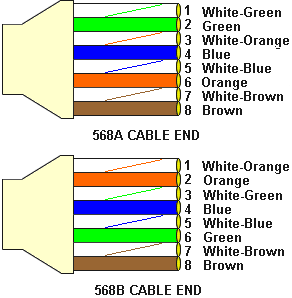
When to use a crossover cable and when to use a straight
cable?
Computer to Computer Crossover
Computer to an normal port on a Hub/Switch Straight
Computer to an uplink port on a Hub/Switch - Crossover
Hub/Switch uplink port to another Hub/Switch uplink port
Crossover
Hub/Switch uplink port to another Hub/Switch normal port -
Straight