Setting up wireless security on Linksys Wireless Router
WRT54G
1. Key in http://192.168.1.1 in the address bar of yur internet
explorer.
2. By default, skip username and enter "admin" as the
password.
3. Go to SSID under Setup Page Security Options, delete linksys
from the "SSID" field and input your own unique SSID name. For
example, "Tan Networks" Click Apply den Continue.
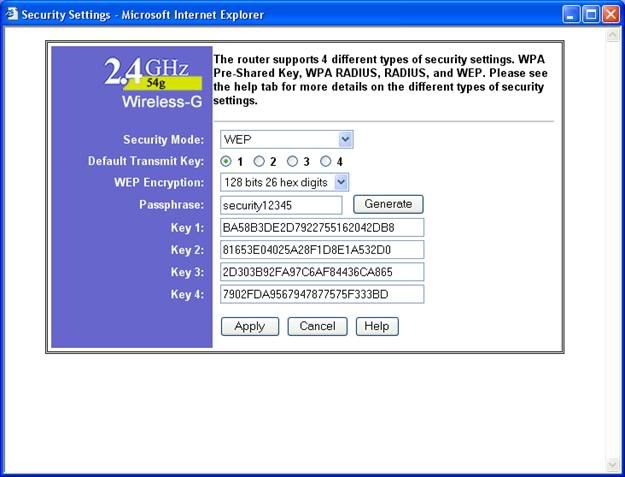
4. Go to WEP, Set Wireless Security to Enable, and click the Edit
Security Settings button, a window pops out asking u Do you want
to enable the Security Encryption? click OK. When the "Security
Settings" Window appears, set the Security Mode to WEP*. Then set
the WEP Encryption to the 128 bits 26 hex digits option. Enter a
passphrase, that is different from the SSID. Try to make it
alphanumeric, then click on Generate. CLick apply and
continue.
Setting up MAC address filtering
1. From the "Setup" page, click the Advanced tab
2. At the Advanced Wireless section, set the Wireless MAC
Filter option to
Enable.
3. Set the option under Wireless MAC Filter to Permit only, then
click the Edit
MAC Filter List button.
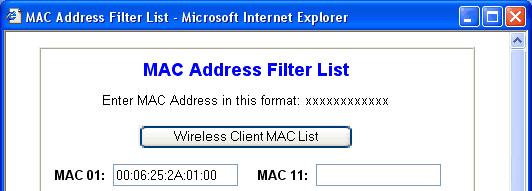
4. When the MAC Address Filter List window appears, click the
Wireless MAC
List button.
5. The Wireless Active Client MAC List window will open, when it
does check
the box under Enable MAC Filter for each of your PCs that are
listed
under Active PC. After you do this, click the Update Filter List
button.
6. After you click the Update Filter List button, you should be
back at
the MAC Address Filter List window, and each of the MAC Addresses
will
be input into their own space. Scroll to the bottom of the list and
click the
Apply button.