This is especially useful for users who do app2sd on their phones
(Android), and having multiple file system (or you can say having
multiple partitions on their SD cards) - ext2,ext3, ext4.
or for some reason you have an SD card, which is of let's say 8gb
capacity but under my computer it only shows 4gb - when you try to
format it (any format)it will only format this 4gb.
------------------------------
A quick check under Disk management under your SD card will show
partitions or unallocated space. - You can access this by pressing
start, then typing:
"Diskmgmt.msc" under the searchbar (For Windows Vista and Windows
7).As most Sgforumers will not be using Xp anymore, those who wish
to know how, please create a new thread (if expired), or please
reply to this thread.
I don't have an exact screenshot cause I was doing a trial and
error in doing so. So bear withit as most screenshots I have would
be found from the net and screenshots from my previous guide
Note:
1. Before you do any recovery, please ensure
that these partitions are empty or you are willing to forgo any
data in it.
2. I'm sure there are other methods, I will
do the long winded method that I did.
Next,right click over the partitions of the SD
card, and click delete volume.
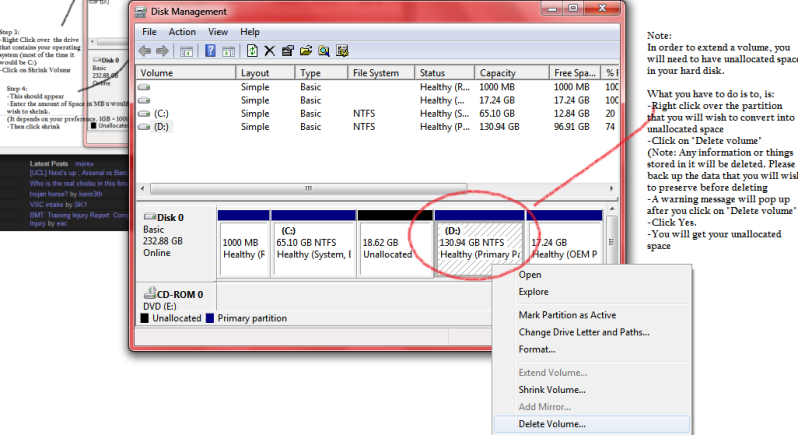
The screen shot above is for an idea of how to delete
only, please follow the instructions that I have mentioned
above, which is to delete the volume of the partition
IN the SD card
3. Depending on the number of partitons, you may have to repeat
step 2 many times, tillyou are left with one unallocated
space and one primary partition.

It will look something like disk1 in the
screenshot above. However it will not be disk one but the address
of the SD card.
This is basically the same as a normal hard disk partition. Now
comes the catch. SD cards are not able to EXTENT
partitions, and that's where people get stuck.
You will have to download this software:
Sdformatter
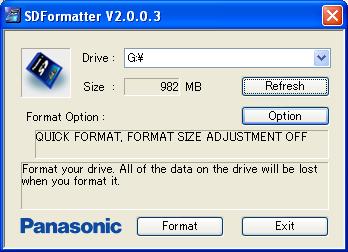
Clicking format, you will get back your capactiy. Let's say it's
4gb at first out of a capacity of 8, the computer will now
recongnise it as 8GB.
Written by: Kenneth, Sgforums.
Screenshots from sources on the web.