If you already have Combofix,
please delete this copy and download it again as it's being updated
regularly.
Please visit this webpage for download links, and instructions for
running the tool:
http://www.bleepingcomputer.com/combofix/how-to-use-combofix
Please ensure you read this
guide carefully and install the Recovery Console
first.
The Windows Recovery Console will allow you to boot up into a
special recovery (repair) mode. This allows us to more easily help
you should your computer have a problem after an attempted removal
of malware. It is a simple procedure that will only take a few
moments of your time.
Once Recovery Console is installed, you should see a blue screen
prompt like the one below:
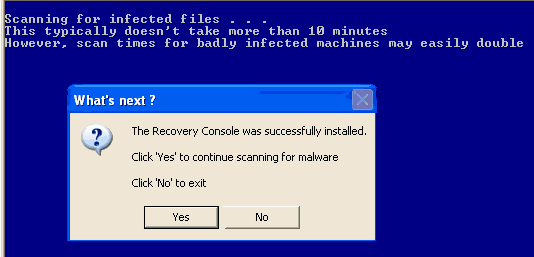
Click Yes to allow Combofix to continue scanning
for malware.
When done, a log will be produced. Please post that log and a new
HijackThis log in your next reply.
Do not mouse click on Combofix
while it is running. That may cause it to
stall.
In your next reply, please post:
Please upload the logs so that sgF doesn't eat away some of the
letters/words in the logs.
Thanks a lot. :) The virus/spyware is already gone.
Thanks.
