LOL... you got an assortment of old and new viruses.
Virus Alert near the clock - New
That bio hazard background - Old
In between, add Vundo.
Disable AntiVir as it will interfere with Combofix.
This topic contains the instructions for disabling AntiVir
Antivirus (find the one with umbrella icon) - http://www.bleepingcomputer.com/forums/topic114351.html
If you already have Combofix,
please delete this copy and download it again as it's being updated
regularly.
Please visit this webpage for download links, and instructions
for running the tool:
http://www.bleepingcomputer.com/combofix/how-to-use-combofix
Please ensure you read this
guide carefully and install the Recovery Console
first.
The Windows Recovery Console will allow you to boot up into a
special recovery (repair) mode. This allows us to more easily help
you should your computer have a problem after an attempted removal
of malware. It is a simple procedure that will only take a few
moments of your time.
Once Recovery Console is installed, you should see a blue screen
prompt like the one below:
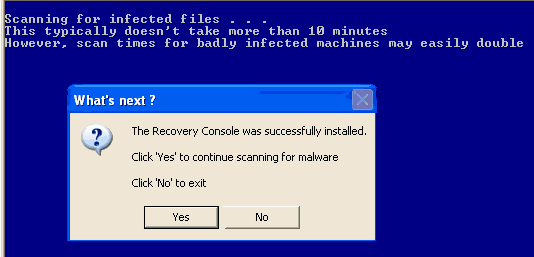
Click Yes to allow Combofix to continue
scanning for malware.
When done, a log will be produced. Please post that log and a
new HijackThis log in your next reply.
Do not mouse click on Combofix
while it is running. That may cause it to
stall.
Upload all the logs to Mediafire as usual so sgF don't eat up
the letters.


