2
methods:
method
1:
Start >
Run > Type
in RunDll32.exe
shell32.dll,Control_RunDLL hotplug.dll
method
2:
Optimise it for quick
removal
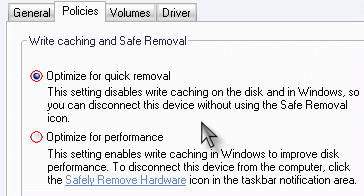
Optimize for Quick removal
This setting disables write caching on the disk so that you can
disconnect this drive without using the Safely Remove
Hardware icon
the other:
Optimize for
Performance
This setting enables the write caching on the disk so as to
improve disk performance. To disconnect this drive, you should use
the Safely Remove
Hardware icon so as not to hurt your USB drive
the choice is yours.