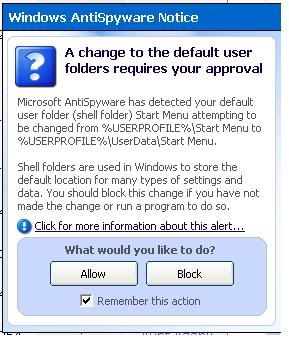
mhcampboy SG This warning pop up just like that. I blocked it. What is it ar? I can't make out what kind of infection is this...
ndmmxiaomayi SG This is Windows Defender, also known as Microsoft Anti-spyware. This picture shows that you have probably installed something and that it will boot on startup or you have just changed some settings. One question for you: Did you install anything just now or did you change any settings?
mhcampboy SG I know that is Microsoft Anti Spyware. This was what I did. I used the Ad Adware SE program to do a scan. Found 4 critical objects. So I deleted it. After deleting it, then the Mircosoft Anti-spyware as above. So I blocked it. I did not change or install anything prior to it.
ndmmxiaomayi SG After deleting the 4 critical objects, Microsoft Anti-spyware warning pop up? Or you did a scan with Microsoft Anti-spyware?
mhcampboy SG Nope. I didnt use MAs to scan. Used the Ad Adware. After deleting the 4 criticial objects and close Ad Adware, immediately the MAs warning as above pop up. My MAs has real time protection enabled though. I am not even sure what does words in the pop up means....
ndmmxiaomayi SG There are spywares/adwares on your computer, and that user is you. Ad-Aware removed it, and Windows feel that it is dangerous, so it warns you. If you block it, those adwares/spywares would be there again, as good as not deleting anything.
SilverPal SG I'm confused, are you saying that the pop up alert is informing the user of the changes made by the ad-aware?