what does PSP firmware means?
This is a common question, actually, and you're spot on when you
call it "firmware". The firmware on the Sony Playstation Portable
(PSP) is basically the same thing as the operating system on your
computer. If you're running a PC, for example, you might have
Windows 98 or Windows XP, but even with a given operating system,
you might have Windows XP or Windows XP SP2 (SP = System Patch).
Macs are the same way, with MacOS 9 for old timers versus Mac OS X,
but Mac OS X is broken down into lots of different versions,
10.2.x, 10.3.x and the latest as of this writing, 10.4.6.
The firmware on the Sony PSP is what you're using when you move
from looking at pictures to listening to your favorite MP3 song,
watching a movie or playing a game. The game specifics itself are
controlled by the given game's software, of course, but that's
exactly like playing Halo 2 on your Windows box: Windows controls
the basic functionality of the computer, but Halo 2 is actually
what's putting all those slick game graphics on the screen, pushing
out the audio, and so on.
The Sony PSP has gone through quite a number of different
firmware versions since its initial release, actually, with the
original units running 1.1, then Sony releasing 1.5, 2.0, 2.5 and
now, 2.6 as the latest firmware release. But how do you know what
version you're running?
To figure out what version of Sony PSP firmware you have on your
PSP, push the little "home" button so you can get to the top level
navigation where you can move between functional areas, then use
the left arrow to move all the way to Settings,
then use the up and down arrows as appropriate to find
System Settings:
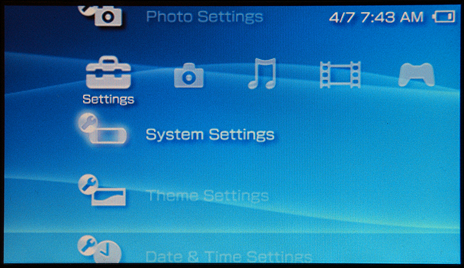
Push the "X" button to select System Settings and you'll get to
System Information:
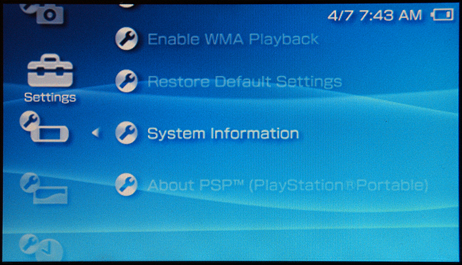
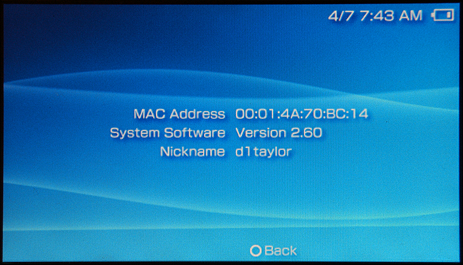
Finally, push the "X" button one more time and you'll find out
what version of the firmware you have on your PSP: