to submarize:
Solving your ram prob
your mobo is the gigabyte GA-8I915P-MF with specs here
http://www.gigabyte.com.tw/Products/Motherboard/Products_Spec.aspx?ClassValue=Motherboard&ProductID=1800&ProductName=GA-8I915P-MF
it only accepts ddr333/400 ram as highlight by NDMLittleant
some knowledge about ram types to speeds
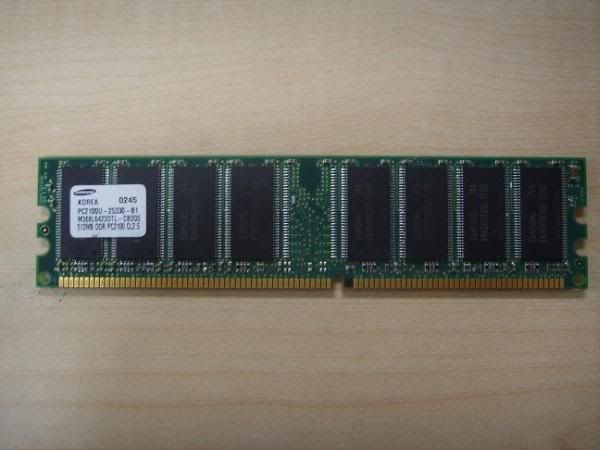
ddr266-PC2100
ddr333-PC2700
ddr400-PC3200
the piece of PC2100 ram shown by TS's photo cannot be used by this
gigabyte mobo GA-8I915P-MF!
now to check the existing ram type the TS's using he can do it with
cpuZ or simply remove the ram and look at the sticker label. check
for any numbering or markings like PCXXXX. that should be
referenced to the above ddrXXX speeds i indicated. if TS has the
answer (e.g PC3200) then he can go over to the shop and ask for ddr
PCXXXX (e.g PC3200) ram module. also since TS must be an axtreme
noob to upgrading and building a computer i will not confuse him by
tellin him the basics.
simply put, if you have the ddr 512mb ram and intend to add another
512mb to your system, you can put the 2 similar modules on either
the purpple or the orange slots for dual ch ddr (max throughput lah
explaining will be troublesome). otherwise you can also put the 2
identical modules side by side in the different color coded slots
no prob.
if the TS just want to add another 1 gig or 256mb ram, he has to
put it on a different color slot. that is, existing ram in purple
slot, new ram module must be in orange slot, no matter if its a 1
gig or 256mb.
solving your graphics card fan problem
if the card comes without the fan most prob the manufacturer do not
anticipate prob for its operation without active cooling so there
is no need for you to worry. however if your gf card has a fan and
its not working, try removing it from the heatsink (the metal piece
of block over the chip underneath). you can buy a cooling fan
assembly mounted on PCI slot bracket like this one here
http://www.ocmodshop.com/ocmodshop.aspx?a=746
it should be installed on the PCI slot directly below the graphics
card or AGP port that houses your graphics card.
solving your hdd problem
the existing hdd you have are all sata ones as shown in the photos
so no prob. however u requested to add another PATA drive to your
system. for this GA-8IP915P-MF board, there is only 1 IDE slot.
most probably its been taken up by an optical drive. if you have 2
optical drives installed please let us know coz the solution will
take longer to explain but right now we are assuming you have only
one optical drive (i.e dvd/cd rom/ writer). if you optical drive is
set to master, your new PATA hdd must be slave, and vice
versa.
okay now to the booting sequence. are you running the system from
an OS installed on your SATA hdd? if so at the BIOS set the booting
sequence to boot from your sata hdd # as shown in your mobo's user
manual. if you are booting from your PATA drive set the sequence
accordingly.
normally you can set sequence like example;
1st boot device - rom
2nd boot device - floppy
3rd boot device - the designated
drive, PATA or SATA with the operating system, your
choice
with such the remainding drive will appear as another drive letter
other than 'C' and the data within can still be access at 'my
computer' even if its has another operating system of its own.
there will not be any conflict, there should not be any.
hope the above helps